
Real estate sales pipeline CRM
What this page covers
This page covers real estate sales pipeline CRM workflows within a connected CRM that brings together deals, clients, activities, calendars, and automation.
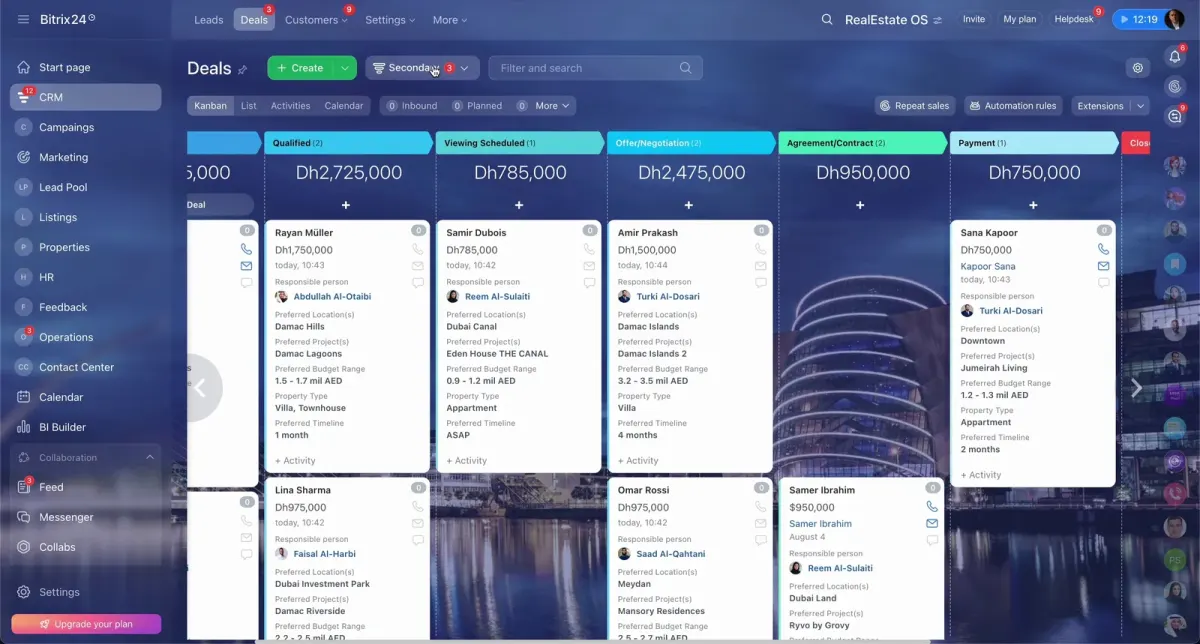
The setup shown uses a kanban-style deal pipeline with stages such as Inbound, Arranging, Site Visit, Negotiation, Contracting, and Closed Lost.
Use this section to explore pages focused on pipeline design, CRM structure, and the deal stages used to manage property sales from inquiry to closing.
What to choose
- Choose deal pipeline software if you want to focus on how opportunities move through clear stages and how teams manage work in a visual pipeline.
- Choose sales pipeline CRM if you need a broader CRM view that connects deals with clients, activities, calendars, forms, and day-to-day team coordination.
- Choose real estate deal stages from inquiry to closing if your main task is defining a consistent stage sequence for managing property sales.
Where to go next
The pages below break this topic into more specific paths, including pipeline software, sales CRM setup, and stage design for real estate deals.
They are useful when you need clearer sales workflows, more consistent reporting, and better visibility from first inquiry through contracting.
What matters
- The workspace shown includes CRM deal management with kanban and list views, activities, calendar tools, automation rules, and BI Builder.
- The displayed sales stages include Inbound, Arranging, Site Visit, Negotiation, Contracting, and Closed Lost.
- The wider CRM approach supports one connected platform for teams, client records, and sales-related work.