
Client interaction history in CRM
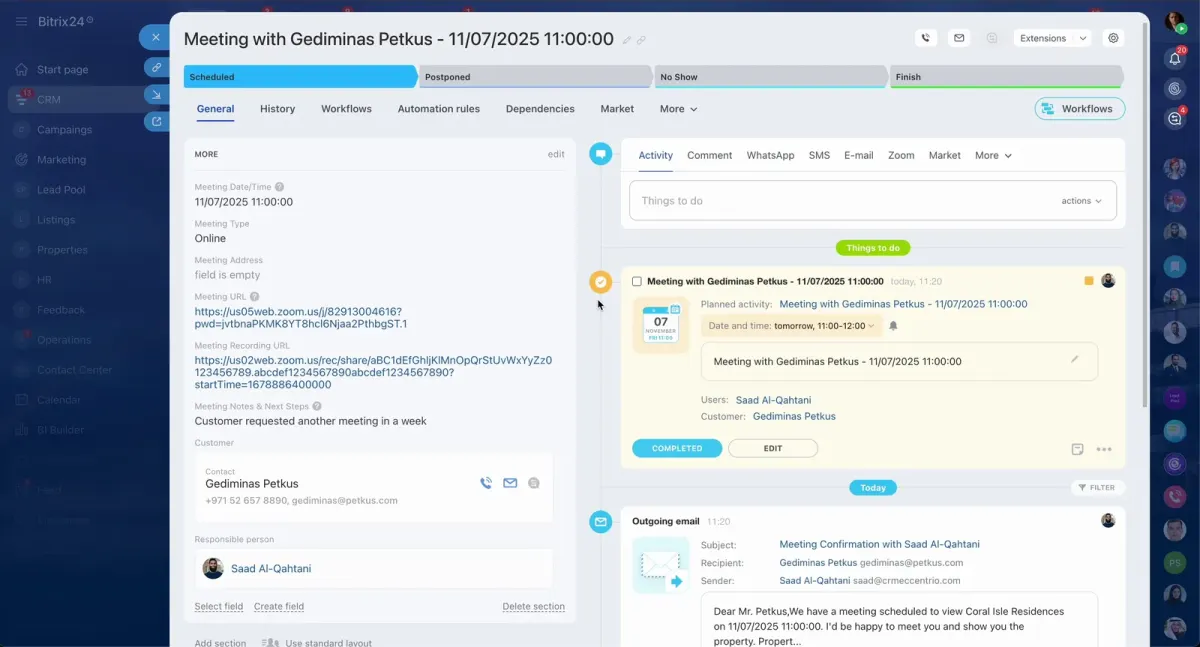
What this page covers
Client interaction history in CRM keeps calls, emails, messages, meetings, tasks, and client context in one place instead of scattered across separate tools.
Built on Bitrix24, this setup connects CRM, communication, collaboration, and task management in one system to support a more organized daily workflow.
For real estate brokerages, it helps track client interactions alongside leads, property listings, deals, documents, and follow-up activity within one CRM environment.
What to choose
- Choose this topic if you need one place to review calls, emails, messages, meetings, and related CRM activity for each client record.
- This is relevant if your brokerage wants interaction history linked with lead capture, listings, deals, documents, and follow-up tasks.
- If you also need to organize how work moves from first contact through each deal stage, the pipeline CRM page is the next step.
Where to go next
The page in this section explains how a centralized CRM setup can support day-to-day real estate sales work powered by Bitrix24.
Continue below to explore pipeline CRM as a related topic for organizing lead flow, deal stages, and team visibility around client activity history.
What matters
- Bitrix24 is presented as a unified business platform that combines CRM, collaboration tools, task management, and communication in one ecosystem.
- The real estate setup is described as helping brokerages capture leads, manage property listings, close deals, issue documents, and track client interactions in one CRM.
- If you want to discuss your brokerage needs, you can contact the team on WhatsApp.